Adding an n8n Widget to Homepage with Secure Metrics
Why I Wanted n8n Metrics on Homepage
When running a small homelab, visibility matters more than dashboards.
I don’t want Grafana for everything — I just want to know at a glance:
- how many workflows exist
- how busy n8n has been today
- whether something failed recently
Homepage already acts as my control panel, so the natural question was:
Can I add a real n8n widget without exposing the n8n API?
Short answer: yes, using a custom API widget and a secured n8n webhook.
This post shows exactly how.
High-level Architecture
The idea is simple:
- Homepage calls a custom API endpoint
- That endpoint is an n8n Webhook
- The webhook:
- queries n8n internals (workflows + executions)
- returns a small JSON payload
- Homepage renders that JSON as a widget
What We Will Build
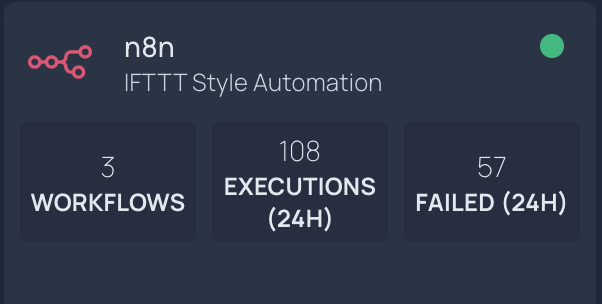
homepage n8n widget
Final widget metrics:
- Workflows → total workflows
- Executions (24h) → executions started in last 24h
- Failed (24h) → executions failed in last 24h
All behind:
- Docker
- A single webhook
- Header-based authentication
Step 1 — Create the Webhook Entry Point in n8n
Create a new workflow in n8n and add a Webhook node.
Configuration:
- HTTP Method:
GET - Respond:
Using Respond to Webhook node - Authentication:
Header Auth
Header Auth configuration:
- Header Name:
X-Widget-Token - Header Value: a random token of your choice
Activate the workflow.
Copy the Production URL (/webhook/..., not /webhook-test/...).
Step 2 — Count Workflows
Add an n8n → Get many workflows node.
- Return All: false
- Limit: 250
Then add a Code node:
return [
  {
    json: {
      workflows: $input.all().length,
    },
  },
];
Step 3 — Count Executions in the Last 24h (Including Failures)
Add a second branch from the Webhook:
- n8n → Get many executions
- Return All: false
- Limit: 250
- Include Data: false
Then add this Code node:
const cutoff = Date.now() - 24 * 60 * 60 * 1000;
const items = $input.all();

let executions24h = 0;
let failed24h = 0;

for (const it of items) {
  const e = it.json;

  const ts = Date.parse(
    e.startedAt || e.stoppedAt || e.createdAt || ""
  );

  if (Number.isNaN(ts) || ts < cutoff) continue;

  executions24h += 1;

  if (e.status === "error") {
    failed24h += 1;
  }
}

return [
  {
    json: {
      executions_24h: executions24h,
      executions_failed_24h: failed24h,
    },
  },
];
Step 4 — Merge and Respond
Add a Merge node:
- Mode: Combine
- Combine By: Position
- Output: Both inputs merged together
Then add Respond to Webhook:
- Respond With: First Incoming Item
- Response Header:
Content-Type: application/json
Step 5 — Homepage Widget Configuration
widget:
  type: customapi
  url: {{HOMEPAGE_VAR_N8N_WEBHOOK_URL}}
  method: GET
  headers:
    X-Widget-Token: {{HOMEPAGE_VAR_N8N_WIDGET_TOKEN}}
  refreshInterval: 60000
  mappings:
    - field: workflows
      label: Workflows
      format: number
    - field: executions_24h
      label: Executions (24h)
      format: number
    - field: executions_failed_24h
      label: Failed (24h)
      format: number
Security Notes
Do not expose the n8n API directly to Homepage
This approach:
- exposes only a minimal JSON
- keeps API keys private
- cleanly rejects unauthorized requests